


Game updates and live events should build excitement, but they often flood support queues instead. A report shows account-related tickets nearly doubling from 13.9% to 27.5% year over year, driven by returning players who can’t log back in after updates.
This guide covers how to keep players engaged, informed, and active during updates without losing momentum to support bottlenecks or uncertainty.
Why Player Engagement Drops During Game Updates
Updates and events are supposed to build momentum. But without the right support and communication layer, they can interrupt the very engagement you’re trying to boost. Here’s what usually gets in the way:
Common pain points
Players will tolerate downtime. What they don’t tolerate is uncertainty.
When you ship a patch or launch a new event, even small friction points can stack up quickly:
- Logins failing or taking longer than usual
- Confusing event rules or unclear reward structures
- Progress that feels “lost” after a change
- UI shifts that disrupt muscle memory
Legacy support systems make this worse. If players have to leave the game, find a web form, and wait for an email response, the experience feels disconnected from the update you just shipped.
Over time, players learn a pattern: “When something breaks during updates, I’m on my own.” That’s when they close the game, switch to another title, or rally around frustration in community channels instead of the event you planned.
The cost of losing player attention during LiveOps events
Every hour spent waiting for support is:
- One less session in your event
- Fewer chances to explore new content
- Less exposure to the systems and economies you’ve designed
If support and communication feel like bottlenecks, players mentally step away from the event, even if they intend to “come back later.” Many don’t.
How communication gaps impact retention and ratings
When players don’t see clear messaging about known issues, fixes in progress, or changes to the event roadmap, they fill the gaps themselves in chat, Reddit, or reviews. That’s when phrases like “unresponsive devs” and “they don’t care” start showing up.
Common symptoms of communication gaps:
- Support teams repeat the same answers across multiple channels
- Patch notes live in one place, FAQs in another, and in-game messaging in none
- Players discover the “real” status of the event from community rumors before they hear it from you
Over time, that erodes trust, and once trust dips, every future update starts with a disadvantage.
Strategies to Keep Players Engaged During Updates
Updates will always create some turbulence. The goal isn’t to eliminate it entirely, but to frame it for players, guide them through it, and keep their focus on what’s new rather than what’s broken.
Keep players informed with in-game messaging
Important information should appear where the player already is, i.e. in the game. In-game messaging helps studios:
- Announce maintenance windows
- Highlight key changes in clear language
- Link to FAQs
- Surface known issues and workarounds
Use push notifications and chatbots to share real-time updates
Not everyone logs in the moment fixes go live. Push notifications and chatbots allow studios to communicate dynamically:
- “Servers are back up”
- “This issue is now resolved”
- “Updated FAQ is available”
Offer mini-events, challenges, or rewards during downtime
If you know an update will take longer or might feel disruptive, you can turn that potential frustration into a moment of goodwill.
Some studios:
- Offer a small login bonus after maintenance
- Run limited-time challenges that align with the new content
- Provide “welcome back” rewards to players who return after a patch
You don’t need any special tooling to do this. A simple combination of event flags, reward bundles, or time-limited missions can work.
Provide transparent patch notes and progress updates
Patch notes often exist, but they aren’t always designed for the way players actually read.
To keep engagement high:
- Use clear headings and simple language for major changes
- Group LiveOps event information in one place (rules, rewards, timings)
- Call out known issues and fixes in progress
- Share estimated timelines for follow-up patches when needed
The Role of In-Game Support During Live Events
Even with clear messaging and well-designed events, players will still run into issues and questions. In-game support is the safety net that protects engagement when something goes wrong.
AI chatbots that answer player queries instantly
During live events, timing matters. Players don’t want to wait hours to know whether they’ll receive a missing reward or if a known bug affects their progress.
You can create your own guided flows or basic bots to answer frequently asked questions about:
- Event start and end times
- Eligibility for rewards
- Known bugs and current workarounds
Helpshift’s AI-powered chatbots go further by handling common questions automatically, using your existing FAQs and workflows. That means players get instant answers inside the game, and your agents can focus on the edge cases that truly need human attention.
Real-time support for bug reports and connectivity issues
When a bug or connectivity issue appears mid-event, your team needs more than a shared inbox.
Legacy tools often mean:
- Manual triage of every ticket
- Slow routing to the right specialists
- Long delays before players see a useful response
You can improve this on your own with routing rules and macros in your current system. But at scale, especially during big events, AI-driven routing makes a noticeable difference.
Helpshift’s Smart Intents and automated workflows help detect what a query is about and route it to the right queue or bot, reducing bottlenecks in assignment and keeping serious issues moving quickly through your support process. That’s how you protect engagement even when something unexpected happens.
Collecting feedback through in-game surveys
Events and updates are also learning opportunities.
In-game surveys let you:
- Ask players what confused them during an event
- Understand whether rewards felt fair
- Capture sentiment while the experience is still fresh
You don’t have to wait for app store reviews to understand how players felt. Short surveys embedded in your game or support flow give you a more accurate signal.
Helpshift supports in-game surveys so you can measure satisfaction after an issue is resolved or an event ends, then use those insights to refine your next update.
How Helpshift Enables Smooth Update Experiences
Once you’ve designed your communication and support strategy, the next step is building an operational layer that can keep up with real players, real volume, and real events.
In-app messaging to keep players connected

Players should be able to ask for help and receive updates without leaving your game. Helpshift’s in-app messaging brings chat directly into your game client, with a UI you can theme to match your world.
Players can see event updates, submit issues, and receive replies in the same space where they play, which keeps them engaged even when they’re waiting for a fix.
Automated workflows for common update issues

Update-related tickets tend to follow patterns: missing rewards, crashes on specific devices, login problems, or confusion about event rules.
Helpshift lets you define automated workflows where Smart Intents detect the topic of a query and route it to the right bot or queue. Bots can gather details, suggest FAQs, or resolve simple cases outright, while human agents focus on high-impact problems. This reduces bottlenecks in assignment and keeps your team ahead of the volume curve instead of fighting it.
Multilingual support for global event launches

Global games rarely ship updates to a single region. But if your support is only strong in one language, players in other markets experience a very different event.
Helpshift’s Language AI supports multilingual communication directly inside the platform, allowing agents to respond in many languages while working from a single workspace. That means players in different regions can receive timely, localized support during updates and events, instead of waiting behind your primary-language queue.
Analytics to monitor player sentiment during updates
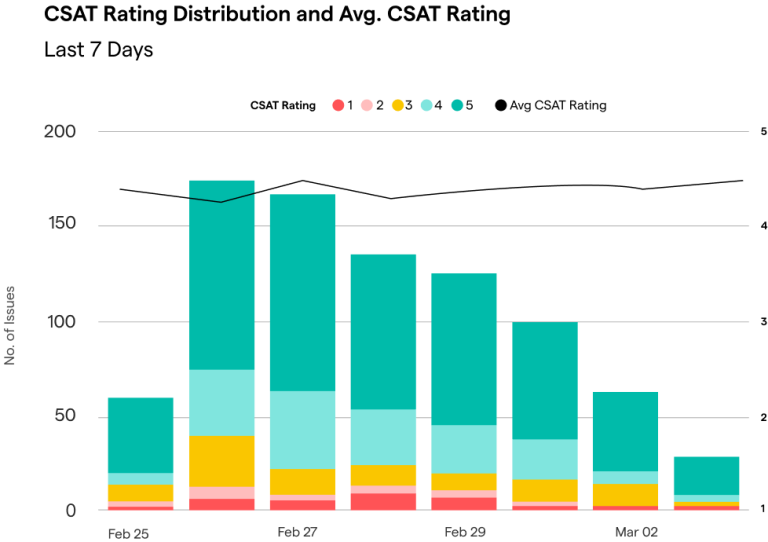
Updates and events are high-signal moments. If you only look at topline metrics weeks later, you miss opportunities to correct course in real time.
Helpshift’s analytics bring these signals together so you can see how players experience a specific update, which issues cause the most friction, and where automation or clearer communication would have made a difference. That insight feeds directly into better planning for your next event.
Case Studies: Keeping Engagement High Through Updates
Real studios have already made this shift away from legacy systems toward integrated, in-game support. Their results show what’s possible when support and LiveOps work together.
AIDIS: Scaling Support With Automation During Global Launches
When you rely on email-based queues or external portals, players feel every delay.
A similar challenge appeared at AIDIS with its globally distributed title Critter Crew. By moving to in-game support with Helpshift and investing in automation and self-service, the team achieved 90% FAQ deflection, so most simple questions never reached an agent and players could resolve them on their own.
SYBO: Sustaining LiveOps Momentum for a Massive Player Base
Big event windows put a spotlight on how your support stack behaves at scale. If most of your tickets still depend on manual routing or email, your team will struggle to keep up when volume spikes.
SYBO, the studio behind Subway Surfers, faced similar constraints with an email-based system before implementing Helpshift. With in-game messaging, optimized FAQs, and automation, the team reached a 95% deflection rate in Subway Surfers, freeing agents to handle complex issues while routine questions were resolved automatically.
Huuuge: Reducing Response Time During Multilingual Event Surges
Global events introduce another layer: language. If your players span multiple markets, every update surfaces questions in many languages at once. Legacy translation workflows quickly become a bottleneck.
Huuuge, a social casino game developer, adopted Helpshift’s Language AI to support a wide multilingual audience. With AI in place, the team reduced time to first response by 21.3%, while maintaining strong CSAT even for VIP players.
Best Practices for Event Communication and Support
You don’t need to overhaul everything at once. You can start by treating every update and event as a communication and support project, not just a content drop.
Communicate early and consistently
Set expectations before you flip the switch.
- Announce maintenance or update windows clearly
- Share a simple breakdown of what’s changing and why it matters
- Repeat key messages across in-game messaging, patch notes, and your support hub
The more predictable your communication pattern becomes, the more confident players feel heading into each update.
Make players feel heard through fast responses
Speed signals care. You can:
- Prepare macros or saved replies for known update issues
- Train agents on likely questions before the event goes live
- Use automation to answer repetitive queries quickly
When players see that their questions get real attention, they’re more willing to stick with an event even if something goes wrong on day one.
Turn frustration into loyalty with proactive support
Every update will surface friction of some kind. The difference between a frustrated churn and a loyal player often comes down to how you respond.
Proactive support looks like:
- Messaging players about known issues before they open a ticket
- Offering small make-goods where appropriate
- Following up after resolution to ask how their experience felt
Helpshift helps teams put this into practice with in-app messaging, surveys, and automated workflows, so proactive support becomes a repeatable habit rather than a one-time fire drill.
Final Thoughts: Engagement Is Built on Trust
Support is a core part of LiveOps. When players trust that you’ll guide them through updates, listen when something breaks, and respond in the game they love, they’re far more likely to stay engaged through every patch and event.
Helpshift is the AI-native player engagement platform built for exactly this — combining AI-powered automation, in-game messaging, and expert human services to keep players engaged, informed, and satisfied through every update and live event, driving long-term player LTV
If you’re ready to move beyond legacy systems and give your players a smoother, more connected update experience, request a Helpshift demo to keep players engaged, even during downtime.